Amazon made a significant change by giving authors and publishers the option to enable no DRM for KDP ebooks for new and existing ebook titles.
When a Kindle ebook is published without DRM, verified buyers can download EPUB or PDF versions of the book from their Amazon account.
DRM has been a topic of discussion for authors right from the very early days of ebooks, and I’ve covered the topic before in earlier articles.
However, the change by Amazon is not exactly as straightforward or momentous as it seems.
Is no DRM for KDP ebooks a good idea?
As an author, perhaps you believe in the concept of DRM-free ebooks because sharing and accessibility are natural parts of owning a book.
If so, you might be tempted to rush to change your ebook settings on KDP.
However, while Amazon now offers a DRM-free option, finding and identifying DRM-free Kindle ebooks as an ebook buyer is not nearly as simple as choosing the option during publishing.
I spent a good few hours trying to find a way to search for DRM-free ebooks in the Amazon Store.
Until recently, it was easy to identify and find ebooks without DRM by looking at the product details.
If this item was in the details, the ebook had no DRM.
“Simultaneous device usage: Unlimited,”
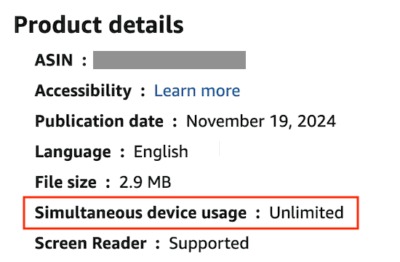 Now, however, this item has disappeared. Well, almost, because the item still appears in the page’s source code.
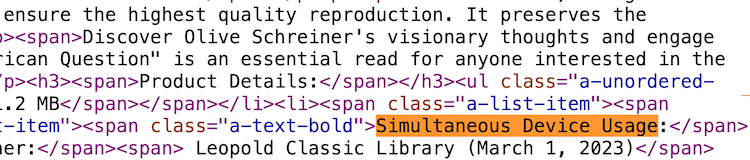
What this suggests is that Amazon has removed the visible information from the Kindle Store while some related data still appears in an ebook page’s source code.
This creates a problem because readers have no simple way to identify DRM-free ebooks before purchasing them.
What does DRM mean for book buyers?
Even though Amazon now offers authors the option to publish KDP ebooks without DRM, this doesn’t mean the option is easy for readers to discover.
For readers, it’s not immediately obvious. Unlike some ebook stores that openly promote DRM-free downloads, Amazon keeps the option tucked away in an Amazon customer’s account settings.
According to Amazon’s KDP help guide:
Reader download access
Effective January 20, 2026, readers can download EPUB and PDF files of your DRM-free books from their Manage Your Content and Devices page on Amazon. Only verified purchasers who have bought your book can access the EPUB/PDF files. Customers who borrowed your books through Kindle Unlimited or other services can’t download the EPUB/PDF files, even if the books are DRM-free.
However, most Amazon book buyers will be totally unaware of this because there is no mention of this process in an ebook’s product details. In other words, the DRM-free option does not provide an open download link on the book page. It only becomes available after a verified purchase.
After searching through hundreds of Kindle ebooks in the Kindle Store, I could only find one visible identifying factor.
Some ebooks offering no DRM protection included this line at the end of the book description:
 If it’s hard to read the image, the line is:
At the Publisher’s request, this title is being sold without Digital Rights Management Software (DRM) applied.
If it’s hard to read the image, the line is:
At the Publisher’s request, this title is being sold without Digital Rights Management Software (DRM) applied.
But I couldn’t find any search results using the term, or part of it, in the Amazon search bar.
The only way I found these ebooks was by using a site: search expression in Google.
So, I guess that some publishers add a note to their Kindle descriptions stating that the book is sold without DRM to inform potential readers.
However, after looking at the source code, this does not appear to be a standard Kindle Store feature, and Amazon does not provide an obvious DRM-free label or search filter.
My conclusion is that although Amazon now allows readers to download DRM-free ebooks after purchase, it hasn’t provided an obvious way for prospective buyers to identify those books before they buy them.
Should you activate no DRM for all your KDP ebooks?
If you want to change from DRM to DRM-free for your ebooks on KDP, it’s a simple option to enable. Go to your ebook and click on “Edit eBook Content.” You’ll see this option panel:

But I’d hesitate if I were you.
A few years ago, I was a proponent of ebooks without digital restrictions.
My belief was that if someone bought one of my print books, they could happily share it with friends or family.
I thought the same freedom should apply after buying and reading an ebook.
But I’ve had a change of heart now due to the obvious threat of AI scanning, quoting, or copying.
A few years ago, I believed the convenience for readers outweighed the risks.
Today, with AI systems capable of scanning and analyzing huge collections of text, I think the balance has shifted.
DRM won’t stop determined pirates or AI companies completely, but it does add another layer of protection.
While nothing is safe and secure from AI, DRM can make it more difficult to copy an ebook.
In fact, I removed my ebooks from retailers offering no DRM ebooks a couple of years ago because of the AI threat and now only have my ebooks on Amazon.
Another factor to consider is Kindle Unlimited subscription reading, which I believe needs strict controls to protect authors’ royalties.
And what makes me even more hesitant is that Amazon doesn’t make this feature obvious to readers, so I struggle to see much practical benefit.
Of course, the decision is up to you, but my advice would be to retain the protection that Amazon DRM provides for your ebooks.
An interesting side note is that Apple Books gives no information about an ebook’s protection, but it’s usually safe to assume that most Apple ebooks are protected.
Conclusion
When I initially looked at this Amazon DRM option, I presumed that it would be a simple matter of changing an ebook’s protection, and readers and book buyers could then make a choice.
But after checking how it would display in an ebook’s product details, the option started to look a bit strange to me.
I tried every trick I knew when searching the Amazon Kindle Store, but it was a dead end every time.
My conclusion is simple.
Amazon has given authors the option to publish DRM-free ebooks, but it hasn’t made those books easy for readers to discover or identify.
Until that changes, I’m not convinced there’s much advantage in removing DRM from your KDP ebooks.
Author’s note:
After spending hours trying to work out how book buyers could find DRM-free Kindle ebooks, I couldn’t help thinking of Douglas Adams’ famous description in The Hitchhiker’s Guide to the Galaxy of information being:
“…on display in the bottom of a locked filing cabinet stuck in a disused lavatory with a sign on the door saying ‘Beware of the Leopard.'”
Related Reading: Has AI Stolen My Book Without Permission?

English teacher, writer, and author. Passionate about grammar, creative writing, and self-publishing. Always exploring new tools and tech to help writers succeed.