
I have maintained this guide to free book writing software for many years, helping authors choose the right tools for their needs.
When I first compiled the list, the primary question was simple: Which free app has the best features?
Today, however, the considerations are more complex. Large Language Models (LLMs) and “AI data scraping” are hot topics and pose new risks. Could your 100,000-word manuscript be used for AI training?
With these questions in mind, I have refreshed this page to reflect not only the features but also possible data ownership and privacy concerns.
My Personal Choice: The Secure Traditional Approach
I’ve tried, tested, and used many book writing apps and software over the years. Some were great, some not so good.
However, for most of my writing, I still use a word processor. In my case, it’s Apple Pages. Why?
Because the software is installed on my computer and I can control where I save, backup, and export my files, it means that my data is 100% secure.
You might think that this applies to all word processors. But cloud-based apps are a growing concern in the age of AI.
For instance, Microsoft 365 apps like Word have a setting; “Optional Connected Experiences,” which is on by default. To be truly secure, this should be disabled in your privacy settings to ensure your data isn’t being processed for “product improvement” or AI training.
Google Docs is a real concern for authors. Google’s terms have historically stated that it can use Workspace and Docs data to improve its services. And now, with Gemini AI integrated into every doc, the line between “assisting you” and “learning from you” has become very thin.
That’s why I prefer a word processor that is not a cloud app.
But writing a book with a word processor means taking a lot of care with file management and manual backups for chapters, revisions, and edits.
For many authors, this can be time-consuming and complicated. That’s why a book writing app can be appealing. Everything, including chapters, revisions, and research notes, is stored in one place.
It takes a long time to write a book. You can check how long with our free novel writing calculator.
So, if your preference is for an all-in-one solution, what are your best options?
What to Look for in Book Writing Software
Every book writing tool is different. While a basic word processor is excellent for security, it won’t help you manage the complex moving parts of a 300-page manuscript.
If you decide to move beyond a standard document, here is how dedicated software can help you and what you should check before you start.
1. Chapter and Scene Organization
One of the major advantages is the ability to break your book into manageable sections. Instead of endlessly scrolling through a single 80,000-word file, you can view your book as a series of scenes or chapters. This makes it easy to rearrange your story, such as moving Chapter 5 to Chapter 2 with a simple drag-and-drop.
2. Centralized Research and Notes
A good app keeps your world-building in one place. You can store character profiles, location descriptions, and research photos within the same project as your manuscript. This avoids the “tab-switching” game of jumping between your draft and a dozen different folders or browser tabs.
3. Visual Planning and Timelines
For complex plots, timeline tracking is a lifesaver. Some programs offer visual boards to map out character arcs or prevent “plot holes” by ensuring your protagonist isn’t in two places at once.
4. Goal Setting and Analytics
If you struggle with consistency, progress-tracking tools can provide daily word-count targets. Seeing a visual progress bar can be a great motivator to help you maintain your momentum during the “middle-of-the-book” slump.
5. Exporting Options
Writing is only half the battle. You eventually need to share your work. Look for software that offers practical export options for different needs, such as Word (.docx) for your editors, PDF for beta readers, and EPUB files for self-publishing platforms like KDP or Draft2Digital.
6. Security Check
Before you commit your work to an app, check if it offers local storage (saving to your computer) or cloud sync. If it’s cloud-only, look for an AI opt-out setting to ensure your manuscript isn’t being used as training data for the platform’s “smart” features.
11 Free book writing programs
The following list of free apps and software is to give you a starting point in your search for the best book writing tool for you.
It’s not a ranked list or a set of endorsements, purely informational.
Like most free applications, they can come with limitations, but some offer surprisingly useful features.
Take a look through the list and explore the features to see which one feels like a good fit for your style, workflow, and needs.
1. Novlr (Free and premium)

Novlr is a free novel writing app that helps you get your story out of your head and onto the page.
It’s got all the features you need to stay organized, motivated, and productive without all the clutter.
You can break your novel into chapters, take notes, track your word count, and set goals.
With the free version, you can export to docx or share your chapters or full manuscript.
Novlr also has a distraction-free mode that helps you focus on your writing. You can also choose dark mode if you prefer.
If you’re looking for a simple, effective way to write your novel, then Novlr is definitely worth trying.
The free plan offers all the essential tools to write a book.
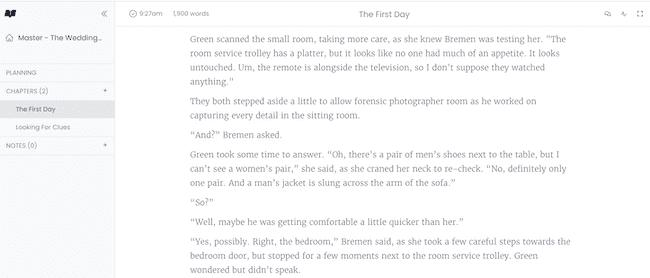
Best For: Writers who want a beautiful, “Apple-like” interface and need their work to sync seamlessly between a laptop, tablet, and phone without manual file management.
Key Features: Automatic cloud syncing, “Focus Mode,” goal-tracking (streaks and word counts), a built-in “Academy” for writing courses, and an offline mode that saves your work to your browser and syncs once you’re back online.
Privacy Note: Moderate. Novlr is a “writer-owned” platform, which gives it a much better ethical standing than a giant corporation. However, because it is a cloud-first service, your manuscript lives on their servers.
2. novelWriter (Free)

novelWriter is a free, open-source desktop writing software program designed especially for authors.
Instead of using a browser or cloud‑only service, you can install this program on Windows, macOS, or Linux and save all your writing locally. That means you have full control of your files and don’t have to rely on an online server.
You get advanced scene and chapter organization, character and location notes, and a powerful “Project Tree.” It also has a statistics tool to check your word count goals and progress.
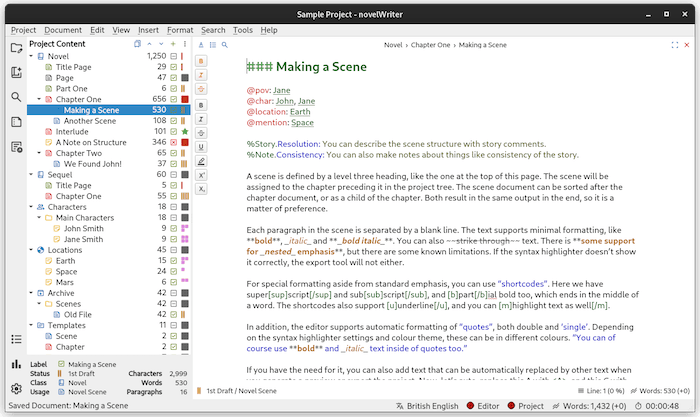
The auto‑save and manual save options mean that you can safely save all your work on your hard drive in a robust plain‑text format.
For writers who prefer to work offline, keep full control of their manuscripts, and want something more than a basic word processor, novelWriter is a worthy free option.
Best For: “Plotters” and technical-minded writers who want a robust, Scrivener-like experience without the price tag. It is ideal for those who want to manage a complex series of notes, characters, and plot lines in a single project.
Key Features: A “Project Tree” to organize your manuscript by scene or chapter, a powerful “metadata” system for tagging characters and locations, and a “Novel View” that lets you see your entire book structure at a glance. It also includes a distraction-free “Focus Mode.”
Privacy Note: Excellent. novelWriter is a standalone desktop application. Because it uses simple, human-readable text files stored directly on your hard drive, there is zero risk of AI scraping or cloud data leaks. It does not require an internet connection, ensuring you maintain 100% data sovereignty.
3. yWriter (Free)
I have to include yWriter because it was developed by a writer, Simon Haynes.
He explains the reason for going to all the trouble to create this software, and it should resonate with many writers.
“I really struggled with my first novel. I wrote slabs of text into a big word processor file, and I just couldn’t make sense of the whole thing at once. No real overview, no easy jumping from scene to scene, nothing.”
It is a great explanation of why word processors are not designed for writing fiction.
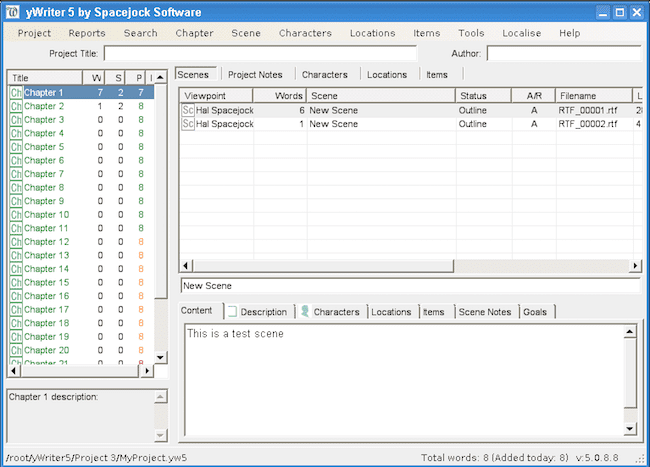
The key feature of yWriter is that it breaks book writing into chapters and scenes. When writing a book, this is a must-have feature.
It also comes with the ability to build characters and locations.
Best For: “Structuralists” and technical writers who want to track every detail of their plot without paying for Scrivener.
Key Features: Scene-based organization, character/item/location tracking, “Storyboard” view, and automatic project backups.
Privacy Note: Excellent. yWriter is famously “anti-bloat.” It does not phone home, does not use your work for AI training, and stays completely offline.
4. Manuskript (Free)
Manuskript is a feature-rich book writing tool.
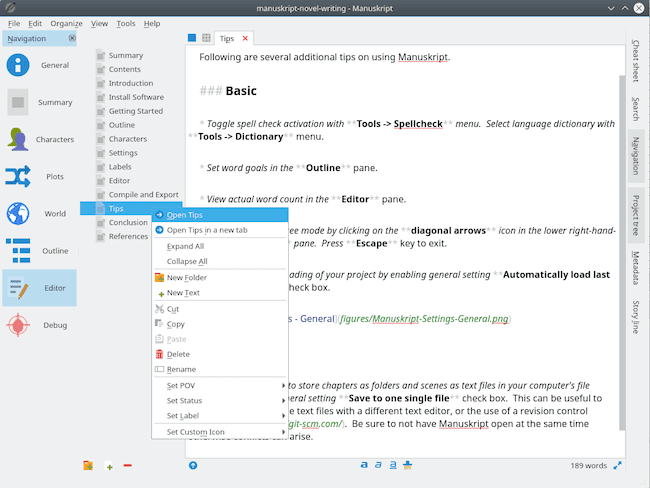
It has an outliner, word count, and distraction-free mode. It also has a novel assistant to help you. With it, you can develop characters using the snowflake method.
You can also keep track of notes about your characters, the plot, events, and places in your story.
These tools will certainly help improve your writing.
It is well worth a try for a new author.
Best For: “Plotters” who use the Snowflake Method and want a deep, organized project structure.
Key Features: Snowflake Method assistant, hierarchical outliner, character/world-building database, and distraction-free editor.
Privacy Note: Excellent. Vault Tier. Because it is open-source and local, it is physically impossible for the developers to “scrape” your data. It is one of the safest environments for a high-value manuscript.
5. Sigil (Free)

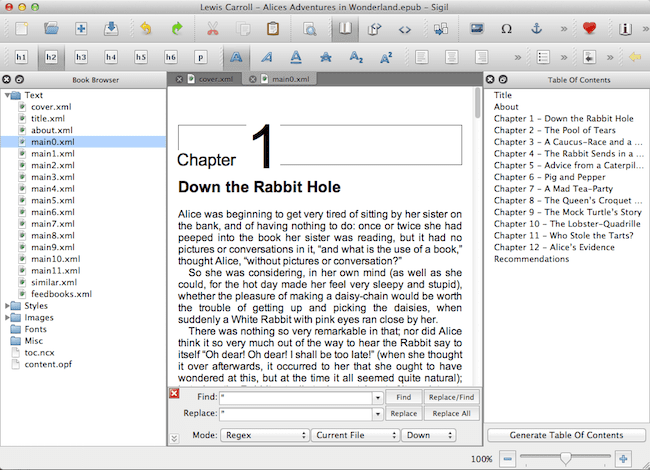
Sigil is open-source, free software that is well-regarded for producing e-books in EPUB format.
In this respect, it is similar to, if not even better than, Calibre.
It has multiple views, including book view, code view, and preview, as well as a WYSIWYG editor.
It also has a Table of Contents generator with multi-level heading support.
There is a metadata editor as well as a spell check with default and user dictionaries.
It also supports the import of EPUB and HTML files, images, and style sheets.
Best For: Self-published authors who want to do their own final formatting or fix issues in an existing EPUB file.
Key Features: WYSIWYG and code editing, metadata editor, table of contents generator, and EPUB validation tools.
Privacy Note: Excellent. It does not connect to any cloud servers to store your manuscript, nor does it include any data-scraping or AI-training components. Your files stay 100% on your own hard drive.
6. Reedsy Studio (Free and Premium)

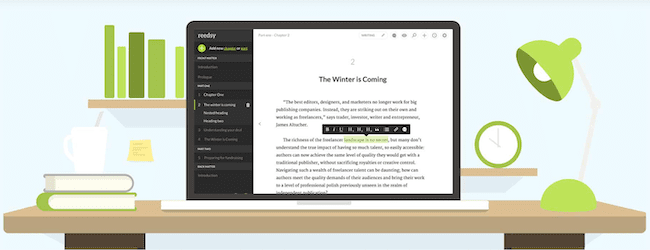
Reedsy Studio is a great free online writing tool for authors.
You can write, format, and export your book to EPUB for ebooks and PDF for print books.
If you have already started writing your book, you can import a Word docx file.
It’s easy to add images and endnotes, and the program also helps you create your table of contents and copyright pages.
Unlike a word processor, the Reedsy editor organizes your book in sections, so it’s easy to navigate to chapters or other parts of your manuscript.
It is a fully featured online editor that has all the tools you need to write and format your book ready for publishing.
Best For: Self-publishing authors who want an “all-in-one” experience. It’s ideal for those who want to write in a clean environment and then instantly turn their draft into a professional, retail-ready ebook or print file without hiring a formatter.
Key Features: Automated professional typesetting (EPUB and PDF), real-time collaboration with co-authors or editors, visual “Planning Boards” for world-building, and goal-tracking with daily writing streaks.
Privacy Note: Moderate. Reedsy is a cloud-based platform, meaning your manuscript is stored on their servers rather than just your local computer. While they have a strong reputation for author rights and have stated they do not use your work for AI training, it does not offer the total level of security of an offline program.
7. Wavemaker (Free)

Wavemaker Novel Writing is a free web app, so you can use it on any device.
You can organize your story using timelines, use planning boards, and it even has a snowflake tool.
Like many other apps, it comes with a dark mode option and distraction-free writing.
Another plus is that even though it is a free app, it doesn’t contain ads.
It has a helpful getting started page, plus plenty of video guides to help you learn how to get the most from the app.
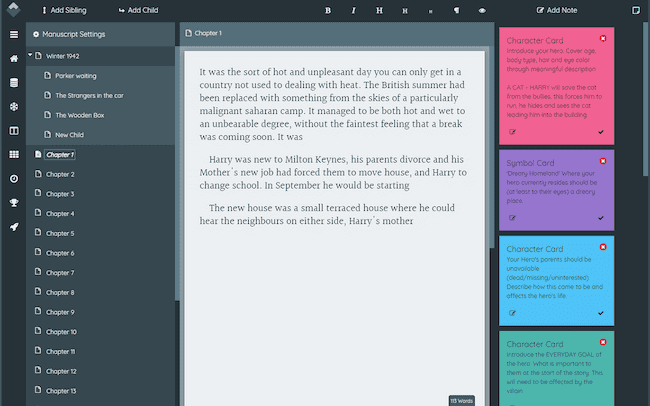
Best For: “Plotters” who need visual tools (like mind maps and storyboards) and want to switch between writing on a laptop and a mobile device without paying a subscription.
Key Features: Snowflake Tool, visual Storyboard, Database Cards (for world-building), and an offline-first mobile experience.
Privacy Note: Excellent. Because Wavemaker stores your data locally in your browser’s database and only connects to the cloud if you choose to sync with your own Google Drive, the developer never sees or has access to your manuscript. It is a very safe option for those wary of AI training.
8. Bibisco (Free)
Bibisco is open-source software. It is specifically designed for writing a novel.
It has all the elements you will need. These include character development and tracking.
There is chapter and scene organization as well as note-taking.
Everything you need to write a novel in one free software package. Bibisco is available for Mac, Windows, and Linux.
Best For: Writers who focus on character-driven stories and want a structured, guided way to interview their protagonists and build a deep story world.
Key Features: Deep character interview tools, world-building management (locations/objects), visual story architecture, and local file storage.
Privacy Note: Excellent. As an offline desktop application, Bibisco does not track your writing or store your manuscript in the cloud. Your intellectual property stays on your hard drive, making it a very secure choice for private authors.
9. FocusWriter (Free)

FocusWriter has one key attribute. It is about total distraction-free writing.
It has many options you need to set things up for writing your book.
But it has a hideaway user interface that lets you concentrate on the one big thing you want to do. Stay focused and write.
Forget about menus, toolbars, drag and drop, or copy and paste with this app.
There is an all focus mode with nothing between you and your words.
It is very user-friendly, free, and available for Linux, Windows, and Mac OS X.
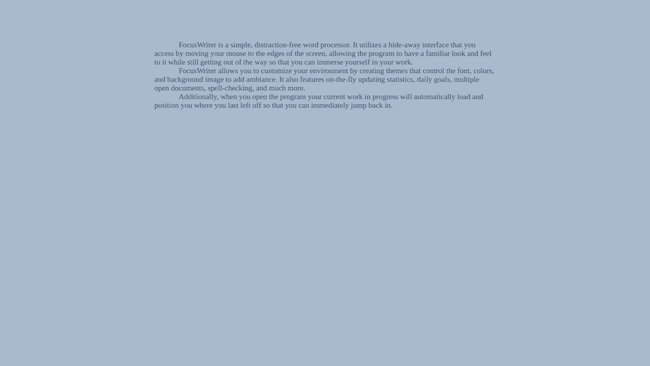
Best For: Writers who struggle with distractions and want a “zen” environment. It is ideal for those who prefer simple file formats and want to avoid the “bloat” of modern word processors.
Key Features: Completely hidden interface, customizable backgrounds and fonts, daily writing goals, multi-document support, and live word count tracking.
Privacy Note: Excellent. FocusWriter is a standalone, offline application. It has no cloud integration, no data-mining, and no AI components. It simply saves your files to your computer, making it one of the most secure environments for your intellectual property.
10. Shaxpir (Free and Premium)

For a dedicated book or novel writing app, Shaxpir really packs a lot into its free version.
With the Manuscript Builder, you can use drag-and-drop tools to rearrange any part of your manuscript.
You can move and change the order of scenes or chapters, so you can work on structures that work for you.
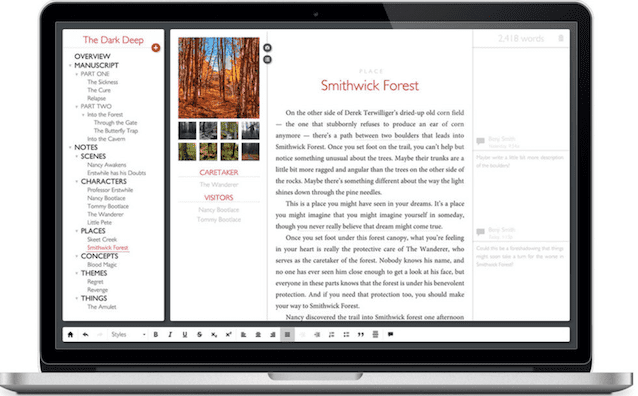
It’s easy to set up writing goals and track your progress. You can also make specific notes about your characters, places, and events.
There is also the facility to add your margin comments, as well as collect any concept art.
It also comes with its own built-in spellchecker.
For free software designed for writing books, Shaxpir offers you a huge range of features.
It is available for PC and Mac users with an option for cloud access.
Best For: Authors who want to “see” their story’s structure and emotional beats visually. It’s ideal for those who enjoy having a dedicated space for concept art and detailed world-building notes alongside their drafts.
Key Features: Manuscript Builder (drag-and-drop chapters), World-Building Notebook with concept art support, basic linguistic highlighting, and real-time cloud syncing.
Privacy Note: Moderate. Shaxpir is a cloud-native platform, so your work is stored on its servers. While they have a strong commitment to author privacy and do not use your data for AI training, it does not offer the same “offline vault” security as a purely local program.
11. Novelist (Free, Android & iOS)

If you want to write on the move, Novelist is a free book writing app available for both Android and iOS devices.
You can plan your story, organize scenes, and track your progress.
Other features include tracking characters, setting word count goals, and exporting your manuscript.
Novelist also offers a distraction-free mode to help you focus on writing.
For a free app, it includes the essential tools you need to get started.
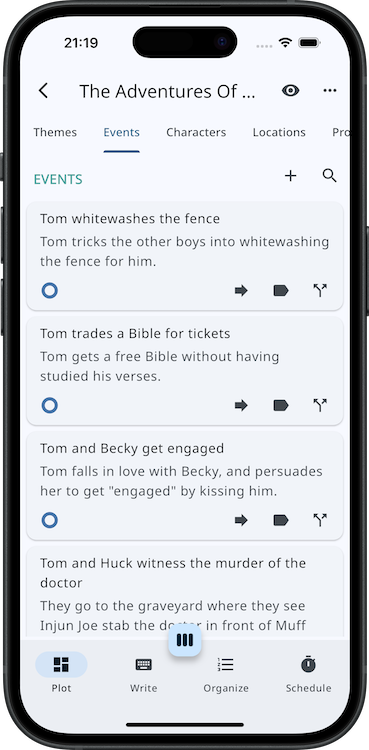
Best For: Mobile-first writers who want to plot and write on their phone or tablet without sacrificing depth. It’s perfect for authors who like a “card-based” system (similar to Scrivener’s corkboard) to move scenes around.
Key Features: Four-stage writing workflow (Plot, Outline, Organize, Schedule), custom templates, goal tracking, and flexible backup options to your own storage.
Privacy Note: Excellent. Novelist is “offline-first.” It doesn’t require an account to use, and your data is stored on your device or your chosen cloud drive. The developer does not have access to your manuscripts, and there are no AI-scraping features built into the app.
1. Scrivener (Free Trial)

I have to include Scrivener on my list.
Scrivener is well-known as the best book writing software program for screenwriters and authors.
It comes with a corkboard, an outliner, side-by-side viewing, word count targets, and a full-screen editor.
There are also print, export, and publishing tools. It has everything a writer could possibly need.
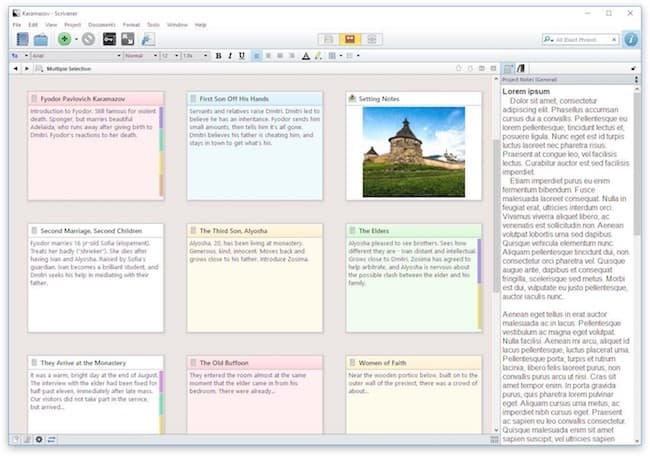
Scrivener is a premium, top-quality book writing program. It has everything you need from the first to the final draft.
However, there is a 30-day free trial period offered by Scrivener.
But it is counted by the days that you use the software. If you use it every second or third day, your trial period will last for 60 days or more.
Scrivener is available to download for both PC and Mac.
Best For: “Power users” and professional authors who need to manage massive amounts of research and complex story structures in one place.
Key Features: Visual Corkboard, “Scrivenings” mode (to view the whole book or just one scene), split-screen editing, and professional-grade metadata and snapshots.
Privacy Note: Excellent. Scrivener is an offline-first application. It does not include AI-writing assistants and does not scrape your data. Your files stay on your machine unless you choose to sync them via a third-party service like Dropbox.
2. The Novel Factory (Free trial)

The big feature of The Novel Factory is the Roadmap.
It puts together tested techniques from leading novelists.
It breaks down writing a novel into small tasks, so beginners can learn the craft of writing.
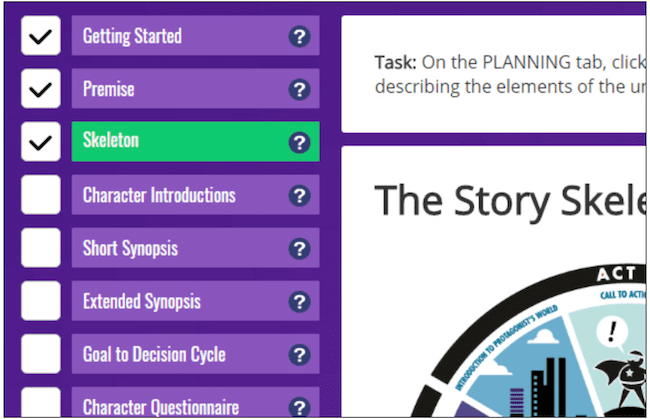
The Locations tab allows you to take down details for your locations.
It includes multiple images to help with your inspiration. It helps you to consider all of the senses in your descriptions to build an immersive story world.
In the Characters tab, you can see your characters in an overview. Or you can open each one to see all the details.
These include the introduction, basic information, your questionnaire, viewpoint synopsis, as well as your history and notes.
Once you’ve written your long synopsis, you have the option to automatically generate scenes directly from it.
Adjust where each scene breaks, and all your scenes will be created automatically. Then you can get on with writing your first draft.
Unlike some other book writing tools, the Novel Factory doesn’t need hours of learning. It’s intuitive from the very first time you open it.
The Novel Factory is available in an online version that works with all operating systems. There is also a desktop version for PC only.
Best For: New authors or those who want a “Roadmap” to follow. It’s perfect for writers who want a structured, guided experience that feels like a creative writing course.
Key Features: Step-by-step Novel Writing Roadmap, deep character development templates, drag-and-drop Plot Manager, and “Deuteragonist” viewpoint tracking.
Privacy Note: Moderate to excellent. Because it is a Progressive Web App, you can work entirely offline. However, it synchronizes to their secure cloud for backups. They have explicit policies stating that your intellectual property is 100% yours and is not used for AI training.
3. Ulysses (Free trial)

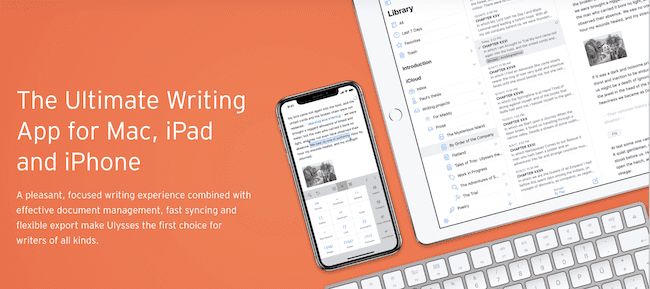
Ulysses is a Mac and Apple-only application.
It works with a unified library that holds everything you’ll ever write a book.
The features are designed to manage writing projects of any size or ambition. You can write notes, blog posts, or a whole novel.
It has all the tools you need for writing, with the main focus on getting the words down.
Ulysses can export to PDF and Word files as well as ebooks. All totally formatted and styled. You can also export to HTML for use anywhere on the web.
You can even publish to WordPress and Medium from within the app.
Everything is just a click away, with on-the-fly switching of styles and a live preview built right in.
Ulysses operates and syncs on Mac, iPhone, and iPad. It is the ideal writing software for Apple users.
Best For: Apple users who write across multiple devices (Mac at home, iPad on the go) and prefer a clean, Markdown-based editor over traditional toolbars.
Key Features: Unified library (no individual files), Markdown XL formatting, advanced grammar and style check, and direct publishing to blogs or professional eBook formats.
Privacy Note: Moderate to excellent. Ulysses uses Apple’s iCloud for synchronization, which is highly secure. They have a “minimal data” philosophy and do not use your manuscripts for AI training. However, because it relies on the cloud for its best features, it is not a “pure” offline vault like Scrivener.
Summary
There are lots of choices in the list of software, programs, and apps above.
I’m sure you’ll find that at least one of these free novel writing software programs and apps will help you write and publish better. Some will help you overcome writer’s block and be more organized, no matter what your writing style is.
You should also use an efficient and reliable online grammar checker. The Hemingway Editor is a good free choice. It will keep your use of adverbs, passive voice, and repeated words under control.
Then you are going to be writing more and better every day. Forget about office applications that are designed for administrative tasks.
Learn how to write a book with tools specifically designed for creative writing and maximizing your writing time.
As I mentioned at the beginning of this article, many premium apps are highly recommended. But they are often more suited to professional authors or content writers.
You don’t need to make a big investment in book writing software for novels. If you are just starting to move away from Word and Google Docs, you have many free options.
Try a few of these free writing apps and see which one works best for you. They can all help you write a better book or novel.
It might not turn you into a bestselling author overnight. But you never know, do you?
Related reading: 10 Free Book Publishing Software And Tools For Self-Publishing

English teacher, writer, and author. Passionate about grammar, creative writing, and self-publishing. Always exploring new tools and tech to help writers succeed.

Manuskript works well for me! installs on linux and on windows. bit fiddly to install but works well. very helpful and guiding. haven’t found a backup utility yet so exporting text for now. Tried quoll earlier but not so impressed. Quoll was too buggy.
Plot factory has been taken down, but was perfect for my needs. Currently I’m searching for a writing app with similar functionalities including the benefits of audio, useful for teasing out complex sentences. Does this app use audio to preview written work?
Thanks in advance
As someone just starting out trying their hand at writing, I will say I have found a lot of useful information on this site and wish I had found it before I started putting “pen to paper.”
Probably like most people trying to write for the first time, I’ve started with the tools at hand: MS Office. One app in MS Office that seems to get overlooked is OneNote.
The best way I can explain OneNote is it is a “jack-of-all-trades” scratch pad. I am currently using it to make various notes about plot, synopsis, character details, and other things of the short stories I’m writing.
Like Word, its not the best tool for the job. However, it seems to be functional for a writing assistant while I look at some of the other tools and find one that best suits me.
What are your thoughts on the Writer’s Café software?
as a novice in book writing{ just getting my thoughts together on how to start} I must appreciate the input f all here. The advice on the writing software is critical, so is the feedback from those like me, who need an easier way forward. I particularly was concerned of how to track my words, page them, and hold together my creativity long enough to put it down to words!
Good luck to all writers
I’d also put in a plug for Write it Now. The trial version doesn’t let you save, but it’s a great way to kick the tires and see how it works. I’ve used both it and Scrivener, and WiN has one thing Scrivener doesn’t: Timelines. It also manages characters and locations better than Scrivener. Scrivener is great for large, fluid projects (I’ve got one in a single file that contains multiple novel-length pieces and another section with over 10 short stories), and has more flexibility if you want to really interlink stuff and go all-out.
I want to start writing my book Pain of the hart m first boo I need to no how to get started .
You can read this article to help you get started. https://justpublishingadvice.com/how-to-write-a-book-and-enjoy-writing-it/
But you should start by tidying up your writing, even in online comments. I think you mean that your first book will be called Pain of the Heart.
The worldcradle link is incorrect; its a dot org site instead.
Thanks for letting me know. I have corrected the link. But it is strange that Wordcradle changed from a .com to .org address without a redirect.
Has anybody tried OnlyOffice?
It looks very good.
I write poems .
Looking for a booklike with flying pages
where to download one by one each poem.
My language is spanish.
Thank you!
Lewis
I downloaded Shaxpir yesterday and got a few hundred words in. My computer restarted itself for an update and I lost everything. As far as I can tell, you can’t manually save with Shaxpir (at least not at the moment) and for the life of me I couldn’t figure out how it saves otherwise. Just a heads-up to anyone thinking about that one.
I’ve given up on Microsoft since they stopped me from using their latest Version of MS Office by closing my account after I tried unsuccesfully to register the damned thing for use… So now I use Open Office and LibreOffice. I’m editing one book on Open while writing the squal to my latest sci-fi novella The Magisters: Book One on Libre…
There is one all-round Book production program out there for decades called OPEN OFFICE , a more than equal package vs. Microsoft Office. They both have a Word component, and the Open Office version Word program is amazing. Of course, all serious would be Novelists need to be using Dragon Naturally Speaking by Nuance and it works in Version 5.3. beautifully, onIy doesn’t work in other versions, or Libre Office Word.
I’ve downloaded Grammarly and ProWritingAid of the free writing apps, but how, with the free apps, do I go about checking a complete manuscript? Nor do I see page numbers to keep check on which page I am. Reception here is practically non-existent – none of the writing apps can be used offline. Any advice please?
Lastly, if I want to improve or enlarge Word Thesaurus that can be used offline and incorporated into the Word Thesaurus, any ideas please.
Hi Kasha. Free versions always have certain limitations. That’s why they are free. Yet they still offer a lot of functionality. But you can’t expect to have unlimited access to all the pro tools for free for a long complex manuscript.
Thanks for the information, I am very motivated to get started on my book project!.
Just getting started. Thank you for writing this article.
This was an excellent post, as it’s always good to see the new products on the market and get some evaluation of them.
And as always, it confirms to me that writing in ordinary wordprocessing with judicious use of styles, page breaks, and grammar checker set to casual, works just fine for me.
Thank goodness we are all different!
Surely, the same risk applies, whichever programme you use? Do any of these programmes save your work independently, or would we have to do it?
Have fun choosing, Vivienne!
Brilliant. I had no idea there was free software for creative writing. now I just have to choose between them. I like the idea of Wordcradle with the index cards. That would be most useful, I think. I also like the idea of Manuskript.
Thank you for this insight.