
For years, I paid for SEO tools.
Like many bloggers, I believed I needed to pay to get the best SEO data, but I’ve changed my mind and now use only free SEO tools.
Why? Because I was using a tiny fraction of the premium features I was paying hundreds of dollars for every month.
On top of that, many of the features I thought were only available by paying were actually quite easy to find using free alternatives.
My Free SEO Toolkit (Quick Overview)
Instead of listing dozens of tools, I’ll focus on a small number that cover everything I need.
These are the best free SEO tools I use every day to manage my site.
- Reporting & data analysis: Google Data Studio
- Search performance: Google Search Console, Bing Webmaster Tools
- Visitor tracking: StatCounter
- Technical & performance: Cloudflare, Ahrefs
- Keyword & idea research: AI tools, SpyFu
Here’s how I use these tools together to manage my SEO without paying for expensive subscriptions.
Why Free SEO Tools Work For Me
When I sat back and thought about what I needed, my main priorities were to track my organic traffic results, look for keyword opportunities, and check my site performance.
I also needed to track my backlinks and traffic sources.
But yes, the one feature I would lose was comprehensive competitive analysis.
On reflection, though, it wasn’t something I used very often.
When I did, it most often simply confirmed site A was doing better than me, or I was ahead of site B.
For a while, I had chased competitors’ keywords, but the result was rarely worthwhile.
SEO for Today
As recent SEO changes have proven, and especially AI search, chasing keywords is now far less effective than it used to be. So many other factors are at play now.
In a way, my change of thinking and relying on only free SEO tools has had one big benefit. It has forced me to think for myself and make decisions based on factual data, not on fancy graphs and estimates.
If you’re looking for a long list of free tools, you might want to stop right here. I don’t use 20 or 30 tools. I use a small, focused set that covers everything I need. But if you want to see how you can manage your SEO with a minimum of fuss, and for free, keep reading.
My Core SEO Tracking Tools (Essential for Every Website)
Every site owner uses Google Search Console (GSC) and Google Analytics. However, both platforms have drawbacks.
Google Analytics 4 (GA4) can be difficult for everyday bloggers to use, making it challenging to pull out the most basic data you need. While Google Search Console is much easier to use, it has a limit of 1,000 entries for all data analysis. Yes, I use both, of course. But I found a much better way is to pull the data into practical reports.
Google Data Studio (Looker Studio)
It took me a little while to master building reports in Data Studio, but the time investment was truly worthwhile.
I use GSC and GA4 as my data sources, and with them connected, I can pull vast amounts of data. To give you one concrete example, I have a query report for all the queries my site is ranking for on Google.
In GSC, I can only see 1,000 results at a time, but my query report can show data for 30, 40, or 50,000 queries, depending on the time scale I choose. This effectively removes one of the biggest limitations of Google Search Console.
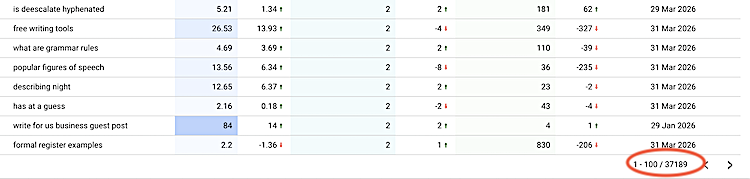
I have other reports for page-level analytics, search terms from users on my site, and session duration. Other reports I built are for splitting traffic stats for direct, Google, Bing, and social traffic.
All of these reports are quick to load and at my fingertips. Depending on what data is important to you, it’s an ideal way to access the data you need and to design it for your needs.
Using Google Data Studio effectively removes the biggest limitations of Google Search Console and Google Analytics 4. It’s now become my number one free SEO tool that I use every day.
Bing Webmaster Tools
This is Bing’s equivalent of Google Search Console. It gives me similar search performance data, keyword insights, backlinks, and indexing information, but specifically for Bing.
However, the big plus is that Bing gives me AI search data.
It shows the total number of citations shown on Bing Search, and the number of my pages that were cited.
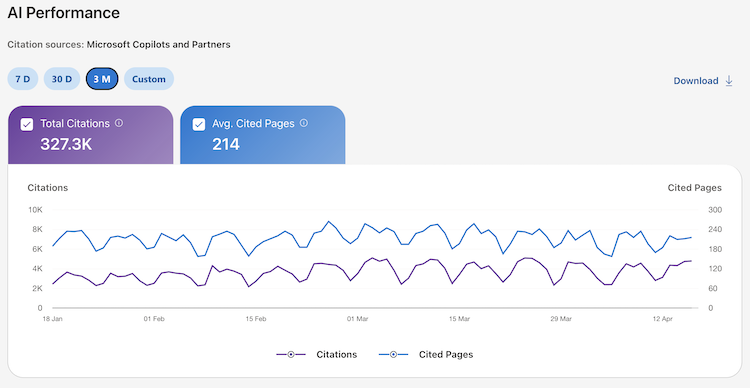
But the best feature is the list of “Grounding Data” that are the search terms that triggered a citation.
This is one of the few places where you can see real user-driven AI search triggers, which makes it surprisingly useful for keyword ideas. It’s one of the few tools that reflects how AI search is actually using my content.
StatCounter
I used to pay for StatCounter, but reverted to the free version. Why?
Because I use it as a snapshot tool for my latest site visitors to check sources, popular pages, and visitor paths.
But as it logs every hit, it’s also very handy for catching bots because it gives me the IP address and location.
That’s crucial data you can’t get from GA4 or GSC.
SpyFu
It’s a competitive research tool that shows which keywords other sites are ranking for.
The free version offers limited data, but it still helps me identify trends, content ideas, and competitors in my niche.
It’s particularly useful for spotting content gaps and new topic ideas quickly.
AI Tools (ChatGPT or Gemini)
I now use AI tools regularly for brainstorming keyword ideas, structuring content, exploring search intent, and basic coding.
You can find so many AI tools for writing and SEO, but I use these two as a support tool rather than a primary SEO tool.
Website Performance & Technical SEO Tools
SEO isn’t only about keywords and traffic. Here are a handful of tools I use to keep my site running efficiently.
Ahrefs (Free Site Scan)
While Ahrefs is a premium SEO platform, it offers a limited free version that can still be useful for bloggers.
You can check and get basic insights about backlinks, keywords, and estimated traffic.
But the best feature of the free version is the site scan to check my site health. I run it once a month to check for broken links or pages, SERP changes, and a whole host of other technical issues that can affect site performance.
Broken Link Checker
There’s nothing more annoying for a user than clicking a dead link.
Running a scan once or twice a month helps me fix any broken internal or external links. I use Broken Link Checker, but you can find many more similar tools.
Cloudflare
Cloudflare is primarily a security and performance layer for websites.
It helps speed up page loading, protects against threats, and also provides a lot of useful traffic insights.
But it’s primarily to improve overall site stability, which indirectly supports SEO.
BetterStack
I’ve tried a few site uptime tools, and most work fine.
But I settled on BetterStack because it emails me anytime one of my sites goes down.
Fortunately, that doesn’t happen very often, but it’s nice insurance.
Optional Tools (I Use Occasionally)
These are handy tools, but not essential to my workflow.
Headline Analyzer
You can find quite a few of these tools now.
I tend to use only one because I don’t need more than to know if a title or headline is reasonable and the right length.
But getting a higher score is always encouraging.
Catchpoint
Like me, you probably use Google’s Page Speed Insights to check pages on your site.
But when I want a more in-depth analysis of my page performance or check for issues of concern, Catchpoint is useful because it gives much more detail.
Conclusion
If you’re paying for SEO tools, maybe think again, as I did.
Times are changing, and gaining organic traffic today is less about keywords and backlinks and more about user intent and AI search.
That’s one of the main reasons I changed my mind and decided to stop paying for what I didn’t really need.
With a small set of free SEO tools, I now have everything I need to track performance, find opportunities, and manage my site effectively.
You don’t need dozens of tools or expensive subscriptions.
You just need the right ones.
Related reading: How To Export WordPress URLs Easily Without A Plugin

English teacher, writer, and author. Passionate about grammar, creative writing, and self-publishing. Always exploring new tools and tech to help writers succeed.