Free backlink checkers are vital tools for bloggers who want to improve search rankings. Yes, keywords are an essential factor in helping your blog to rank on Google and Bing.
However, gaining quality backlinks can help your pages rank higher in the top search positions.
Think about it like this. Your keywords tell search engines where to index your page.
But backlinks are like a popularity and authority contest. The more backlinks you have, the higher your pages will rank for each keyword.
Why No Backlink Tool Tells the Whole Story
When you use backlink tools to check your site, you’ll notice that they often show quite different results. It’s because each one uses a different way to index web data.
Some crawlers include more sites or update more frequently, while some can focus on specific types of links.
The way each crawler counts backlinks can vary, too. Some count every link they find, while others consider the quality, relevance, or authority of links.
Timing can also be a factor. A backlink you earned last week might not appear for some time. Then again, some links may disappear.
These factors mean your backlink data will never be identical from tool to tool. But that’s normal and to be expected. Your aim is to get an overall picture, not a perfect match.
Google Search Console shows links pointing to your site. But while it’s quite accurate, it doesn’t count all links.
Bing Webmaster Tools is quite accurate, too, and it can often show links that GSC misses, but again, it doesn’t count all your backlinks.
Free backlink checkers like Ahrefs, Ubersuggest, or OpenLinkProfiler try to index the entire web. That’s why the data can be very different from GSC or Bing, especially for newer or smaller sites.
Some tools are better at spotting spammy or low-quality links, while others focus on volume or authority metrics. Knowing what each tool tries to do helps you understand the results.
Because of all these differences, no one tool is perfect or the best measure. That’s why using multiple free tools can give you a more rounded view of your backlink profile.
How to Interpret Backlink Data from Different Tools
If you’re a new blogger, backlink data can be a bit confusing because each tool will give you different counts and data.
The best approach is to start with the basics. Most tools show the total number of backlinks pointing to your site. This is a simple measure of your link volume.
Next, look at the number of referring domains. One site may link to you hundreds of times, perhaps because the link is on a sidebar.
When you count domains instead of individual links, it gives a much better idea of your backlink profile.
You should also check link quality or authority scores if a tool shows them. Not all links are equal. A link from a high-authority site is almost always more valuable than several from low-quality or spammy sites.
Some tools might include spam or toxic link data. These can help you identify links you might think harm your SEO. But Google’s advice is to ignore these links, so the data is of little real value now.
You can try to compare your metrics across tools. Google Search Console often shows fewer links than a third-party tool. But the links it does show are confirmed by Google and are usually highly reliable.
Bing Webmaster Tools may show you more or fewer links than GSC.
These links may not impact Google rankings directly, but they can help you rank higher on Bing.
Most third-party tools like Ahrefs, Ubersuggest, and OpenLinkProfiler often include estimated metrics like domain authority or link influence. Treat these as vanity data, not absolute measures.
The best way is to look for patterns instead of simple numbers. Focus on trends like increasing referring domains or more high-quality links.
When you analyze your data, look at the link types. Ideally, you want to see editorial links from content because they are usually stronger than footer, sidebar, or profile links.
If a tool doesn’t separate these for you, look at the anchor links. If it’s a short phrase relevant to your page, it’s usually an editorial link.
By far, the best measure you can use when looking at your backlink data is that your profile is steadily improving and increasing.
How do you get more backlinks?
Of all the ranking signals, your backlink profile is always near the top of the list for Google.
Backlinks, or links pointing to your site, are high-ranking signals because they are tough to get.
Of all the factors in search engine ranking, your total number of backlinks is the one that you can’t easily control. Websites linking to your site are up to other bloggers to decide to do.
There are many link-building strategies for gaining backlinks, but they fall into three broad categories.
1. Outreach campaigns
It’s a popular approach that works by sending emails to blog owners, asking them to add a link to one of your articles. Or, it could ask if they would like a free guest article to publish.
Both methods involve sending hundreds of emails because the conversion rate is extremely low.
I get these types of emails all day and every day, and I rarely act on them.
It’s a time-consuming tactic and annoying for most bloggers. On top of that, Google is well aware of the practice and often ignores external links from guest articles.
2. Directories and free backlinks
Listing your site for free directory listings was popular some years ago.
But now, it is not an effective strategy. The same can be said for trying to get backlinks with a free backlink generator.
Google is aware of these types of strategies, so there is little benefit unless you are looking to get a few quick links for a new site.
3. Organically
Yes, it’s the slow and patient method, but it is the most effective.
You will attract more links if you write great articles with lots of useful information, reliable data, and perhaps authoritative reviews.
Of course, the more organic traffic you can attract, the better your chances are of gaining new backlinks.
Another way is to post infographics or instructive images. You can also post your articles on social media or answer questions on Quora.
You won’t succeed overnight, but for me, it’s the easiest way. Concentrate on publishing great content, and your number of links will grow steadily.

How Do You Check Your Link Profile?
Link checking costs money.
If you want details of every link you have, the ranking of referring domains, or the toxic value, you will need to pay for a backlink checker.
Premium SEO tools and suites are expensive because of the cost of scraping the Internet for all your links.
But unless you are making a lot of money from your blog, the expense is not worth it. Your best solution is to use free backlink checkers.
There are many free alternatives you can use to do your backlink analysis.
There is sometimes a restriction to perhaps 1,000 links, but you don’t need a list of every link you have.
The most vital factor you need to track is your progress in attracting new backlinks pointing to your site.
Here are the most useful free backlink checkers for you to try.
1. Google Search Console
With your Google Search Console (GSC) account, you can get almost all the data you need.
You have to dig around a bit to find your data, but you can export it to Excel or Google Sheets to analyze your links.
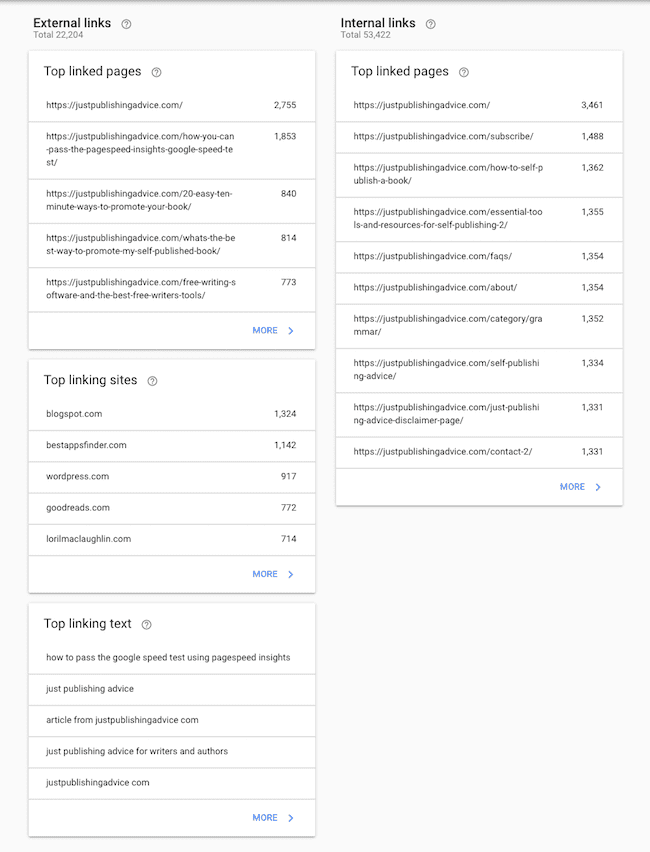
The two bonuses are that you get a listing of your internal links and your top anchor text links.
You should always check for 404 errors in your page links. The best way is to use a broken link checker. You can find many available online.
2. Ahrefs
Ahrefs has replaced its free backlink checker with a new free tool.
The new Ahrefs Webmaster Tools includes all your backlinks and a whole range of keyword tools. It also comes with a full site audit checker.
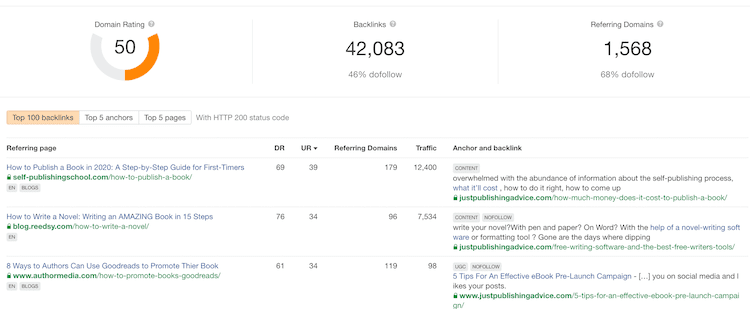
It is now far more than a free backlink checker.
As far as a free SEO tool goes, this has to be one of the best for most bloggers.
3. Semrush
Like Ahrefs, Semrush is a premium SEO software. However, it also has a free backlink checker tool you can use.
The bonus is that you get more expansive details in both data and graphs.
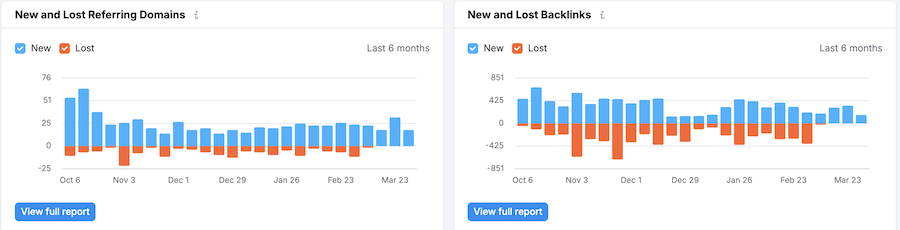
The benefit of tools like this one is that you can compare your data with other free tools.
4. SEO Review Tools
Another quick and easy free backlink checker.
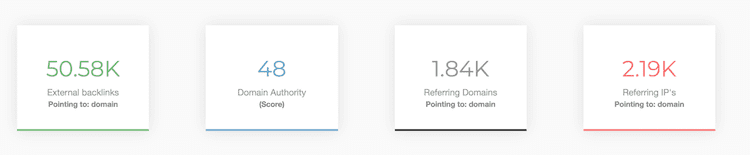
SEO Review Tools only gives you an overall picture, but it’s useful to check your total links and domain score.
5. Bing Webmaster Tools
I only included this on my list because it’s free, and Bing is the number two search engine.
But I’m genuinely not sure how the Bing backlink tool works.
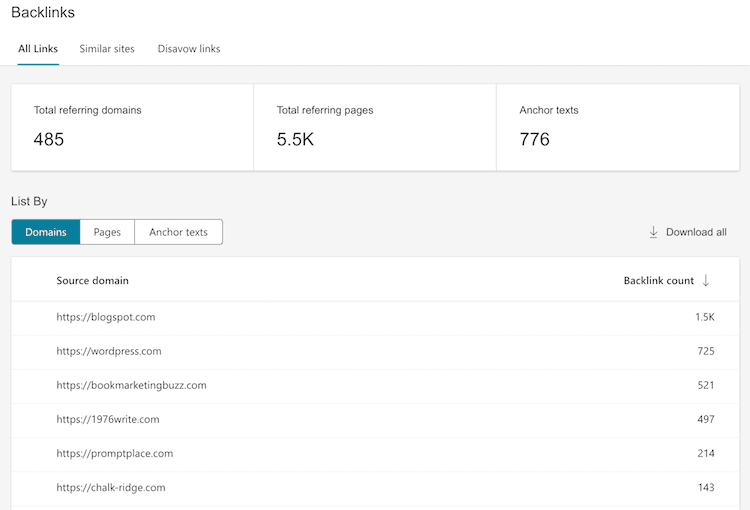
The report always lists far fewer links than all the other tools in this list. My guess is that Bing only lists your backlinks for top-ranking pages. But I’m really not sure.
However, it is well worth your time to register your site because you can track your clicks and impressions from Bing and Yahoo.
You can also do a full site audit scan to check the quality of your SEO as well as research keywords.
6. Open Link Profiler
You need to register to access Open Link Profiler, but it’s worth it.
You get a clear snapshot of your backlink status, with easy-to-read graphs.
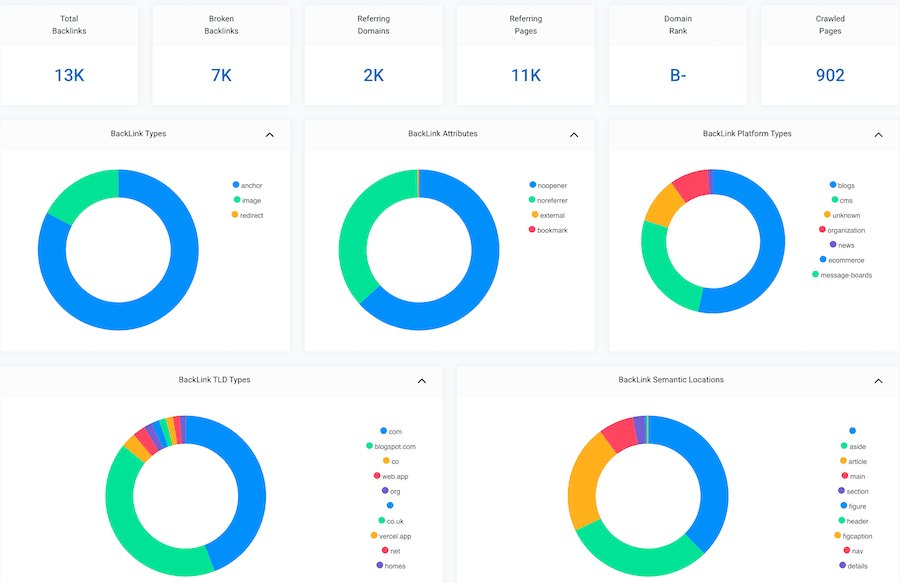
While the data is informative, there’s not much else you can do, and there is no search or export function.
But it’s a quick, free tool that gives you a little extra information.
7. Ubersuggest
I have used Ubersuggest for a long time.
Mostly because it was the only free backlink checker tool that gave you a historical progression graph.
Sadly, this feature is now only available with a premium plan.
However, it is still a useful free tool to give you extra information about your links.

The best feature is the log of entries that gives you the date discovered, domain authority, and anchor text.
The free version gives you keyword rankings and a competitor analysis, so it makes it a handy SEO tool.
Summary
Yes, getting backlinks is a hard slog.
But if you want to rank higher on search engines, you have to attract lots of backlinks.
You can help the process a little by using internal links between your stronger and weaker pages.
Google tracks your internal links, so keep an eye on your data in GSC and add more links to help your posts rank.
But don’t go overboard. Two or three internal links on a post are about the right amount for an 800-word article.
Improving your backlink profile is slow going. But the rewards, in the end, are worth the wait.
As long as your numbers are on an upward trend, search engines will notice, and your SERP rankings will improve.
Related reading: 10 Best Free SEO Tools And Website Checkers For Your Blog

English teacher, writer, and author. Passionate about grammar, creative writing, and self-publishing. Always exploring new tools and tech to help writers succeed.