Promoting your writing on Pinterest doesn’t mean you need to become a Pinterest expert.
All you need to do is give Pinterest something it understands: relevant images pointing to your great writing.
Yes, you need images. Lots of them.
But don’t let that slow you down. It’s much easier than you think to find thousands of free images you can use.
Pinterest is an image search engine
You might think that Pinterest is only for recipes and home decor ideas. But that’s far from the truth.
I doubt you would say that about Google Image Search.
If you’re looking for a new avenue to attract readers to your writing, Pinterest is an ideal platform for promoting books and writing.
One of the big advantages is that your pins (posts on Pinterest) can attract impressions, clicks, and saves for months or even years.
I have some pins that are well over two years old and still attract visitors to my site.
But you need to create pins the right way.
Before you start, one big priority is to set up a business account.
With it, you get access to better analytics, and you can claim your website so your URL shows on your profile. That’s a real bonus when users view your profile.
If you already have a personal account, you can easily change it to a business account.
Now you’re ready to start pinning your blog posts or articles and attracting a new source of traffic to your website.
The anatomy of a Pinterest pin
The best-performing pins for me usually have an image and a text overlay. That’s pretty much the standard approach.
The size of a standard vertical pin is 1000 x 1500 pixels. Yes, almost all pins are vertical.
Another aspect is using a template, which makes it much easier and faster to create new pins. I use Canva, but you can use any graphics editor.
I use a few different templates, but they have similar ingredients. They are a vertical image representing the topic, a descriptive title overlay, and optionally, branding.
Here are a few examples of the templates I have used. As you can see, one is an experimental text-only pin, which has worked quite well.
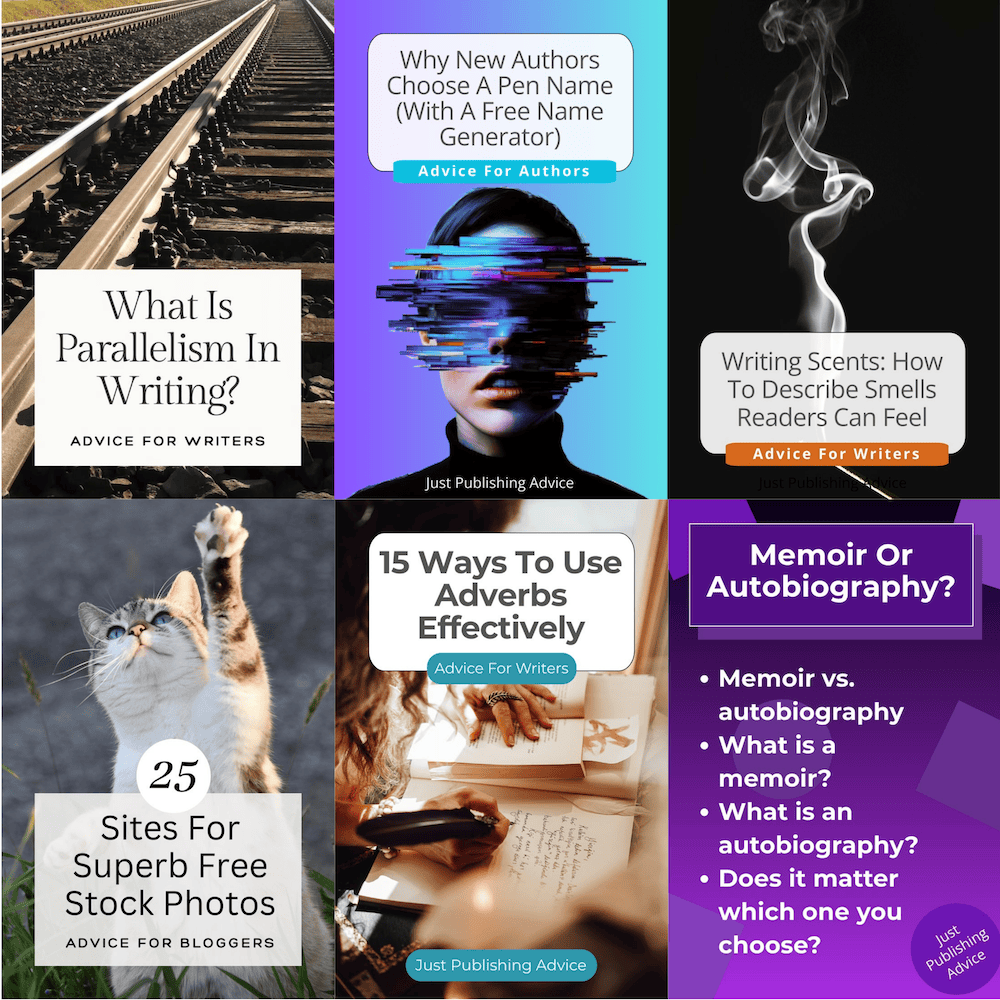
For each new pin you design, you need to add some information before pinning it:
Title: Often, the text overlay is best.
Description: I use the first four paragraphs of an article.
URL: The URL of your article or blog post.
Tags/keywords: You can choose up to 10. There are plenty of writing-related keywords you can choose from.
Alt Text: You can add a text description of your pin. It’s a very good idea, but not essential.
You can add multiple boards to your profile if you want to pin to different topics or subjects.
Then, when you add new pins, you can choose the most appropriate board.
Yes, you need lots of images
Don’t panic; promoting your writing on Pinterest is much easier than you might think.
When you think of photos for writing, it’s usually a pen and paper, a keyboard, a fountain pen, or even a quill.
But they can become pretty boring. I prefer to hunt for images that represent the topic.
For instance, for an article about parallelism, I might use railway tracks. For inversion, perhaps someone hanging upside down. If I pin an article about linking words, I might use a chain.
If you use your imagination, it’s easy to match an image to your article’s writing subject.
As for sources of images, Canva has a lot of photos and graphics, even with a free account. I also use Pixabay regularly.
You can also use any of the many free stock photo sites online.
But you don’t need to collect thousands of unique images. All you need are reliable sources of images and a simple system for turning them into pins.
But here’s a tip. When you select a photo or image to use, change the file name so you can find it again.
For example, if the file name is “9870999-jpl9.jpeg”, change it to “railway tracks.jpeg.” If you use Canva, the image will be stored in your uploads.
If you want to create a pin months later, you can reuse the image.
But your pin images should be unique, so next time you use it, crop it, reposition it, or use it in a different template to make it a little different.
It might take you a little while to get organized with your templates and images, but then you’ll be set to pin regularly.
Making the most of Pinterest
Once you’re comfortable with creating pins, don’t get carried away and pin too often.
I find the best routine is to use the scheduling feature and pin around five times per day. That way my pins are spread out.
Pinning too often, and especially close together, could risk a suspension of your account.
Take it easy and build your pin collection a little each day. It’s tempting to pin more often when you’re trying to build your reach.
You might read advice about pinning more often, but my advice is that being patient works best.
Another trap is posting the same article too often. You can post your articles more than once using a different template or design.
However, don’t do it more than once a month. It’s even better to wait a little longer. I’m not sure of the delay Pinterest checks, but I try to stick to three months between pinning the same URL, just to be on the safe side.
Summary
I’ve had a lot of success with Pinterest.
I don’t break any records, but I get thousands of impressions every month, which helps attract hundreds of new visitors to my website.
The main difference between promoting your writing on Pinterest and on Facebook or X is that you need to be better organized. It’s not a one-click share.
However, once you’ve got everything in place, it’s pretty easy, and it only takes a few minutes to create new pins.
One of the key points to keep an eye on in your Pinterest analytics is the number of saves you gain.
When someone saves your pin, it can gain more impressions for you. In your analytics, it shows as “other pins” instead of “your pins.”
I suspect saves are one of the most important factors in the Pinterest algorithm.
It certainly isn’t a chore for me to add five fresh pins each day. I create a few in the morning and a couple in the afternoon, and schedule them.
My little routine works well for me, and Pinterest has become one of my main sources of traffic to my site.
As long as you use interesting images, add a text overlay, provide a description, and select relevant keywords, you can do the same.
Related Reading: 10 Platforms For Writers To Find New Readers

English teacher, writer, and author. Passionate about grammar, creative writing, and self-publishing. Always exploring new tools and tech to help writers succeed.