Yes, you can certainly use AI to design your book cover. But should you?
For authors, AI can complete almost any task now, from outlining a story, writing the manuscript, to producing a book cover.
Is that what you want to do? And more importantly, is it what readers want to read?
Yes, it’s all quite quick and easy to do, but to what end?
Using AI to create your new book cover
When I research any new article, I use Google and Bing to find ideas. However, this time I was in for a surprise.
I searched Bing for “Can you use AI to design a book cover?” expecting a response similar to Google: an AI overview followed by links to relevant articles.
But no, Bing took the search term literally, and Copilot, very helpfully, instantly generated a book cover for me. Don’t believe me? Here’s the proof.
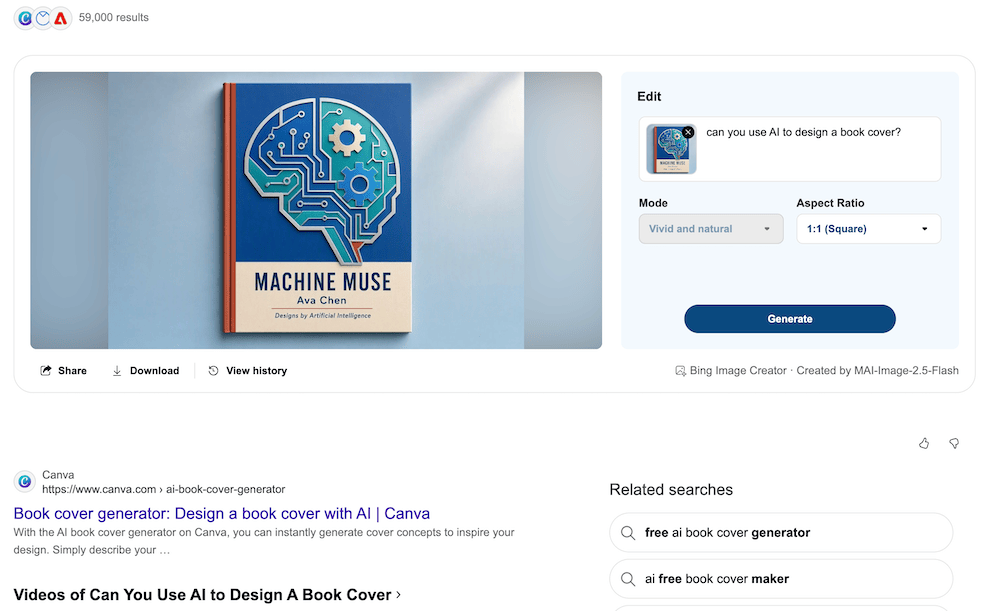
I only included this little surprise because it shows how easy it is now for you to ask AI to create your new book cover.
Yes, this was an accidental creation, but you can find so many AI assistants and tools now to produce book covers.
All you need to do is describe what you want, and hey presto, in less than a minute you have a cover.
If it’s not quite right the first time, you can always ask your tool to edit or change parts of the cover image.
If you’re planning on self-publishing a new book soon, it might seem like an ideal and free way to make a cover. Why spend a lot of money when you can create one for free?
But is it a wise choice?
The technicalities of an AI book cover
The basics for an ebook cover start with the dimensions. AI tools, and especially some free tools, may not be able to produce a compliant cover.
Before you attempt to make a book cover using AI, be sure that you can produce one that your publishing platform will accept.
Amazon KDP recommends the dimensions of 2,560 pixels in height x 1,600 pixels in width. The minimum resolution is 300 DPI, and the preferred file type is JPEG. Source KDP
For a print book cover, it must be a single PDF file that includes the back cover, spine, and front cover as one image.
Like ebooks, the minimum resolution is 300 DPI (dots per inch).
The maximum file size that KDP accepts is 650MB.
Apart from the size, another vital point is whether an AI image generation tool can handle text properly.
Your book cover needs a title and author name as a minimum, but may also include a subtitle and additional text.
AI tools cannot always handle text and typography very well. Some change the spelling of words or mangle lines of text.
Sometimes the only alternative is to use an image editor to overlay the cover text.
Copyright and commercial use can also be a concern. The copyright status of AI-generated work varies between jurisdictions, particularly when there is little or no human creative input. So check the current rules in your country before relying on an AI-generated image for commercial use.
The requirements of self-publishing platforms have changed in recent years due to the proliferation of AI-generated books.
Depending on which platform you use, you might need to disclose your AI use as no AI, AI-assisted, or AI-generated.
Logically, any book cover created in full with AI may need to be classified or marked as AI-generated content to comply with a platform’s content policies.
The anti-AI movement
Yes, if there’s no technical reason stopping you, why not leave it to AI to create your new book cover?
That’s a technical and practical question, but maybe not the one you should be asking.
This question could be a better one to ask yourself.
How will using AI affect my reputation as an author?
You’ve probably read articles in the news about authors being accused of using AI.
In the past, plagiarism was the worst sin of all for an author, but today, AI use is the new mud that sticks.
In almost every form of writing, some, if not many readers, take a negative view of AI use.
If you created your book cover with AI, the obvious question is whether you also used AI to write your book.
It’s about perception. Of course, I’ve experimented with AI-generated images for my blog and social media.
Because I write about writing, it’s not always easy to find suitable images. How many images of a pen and paper can I use? So, I created a handful of new images using AI.
But one comment from a user on Pinterest has stuck with me. “It would be better if you didn’t use an AI image.”
That’s hardly a reputation-killing comment, but it is symptomatic of how readers react now to AI.
It’s almost always negative.
And that’s why deciding to use AI to create your new book cover is not about the technical possibility; it’s about the possible reader reaction.
Summary
Before AI, almost every author searched for free book covers or free book cover creators.
Because self-publishing is rarely a huge money-maker, paying anything from $35 for a pre-made cover to hundreds of dollars for a custom-made book cover was always a pain point.
It still is today. That’s why the attraction of creating a free book cover has always been tempting.
The only difference is that now free book covers can be created with new AI tools.
So nothing has changed, except that the old ways didn’t attract negative reactions other than “I don’t like your cover.”
Now it’s “Your book cover is AI, so you must also use it to write.”
That’s what has changed, and it’s what you need to consider if you’re tempted to create your new book cover using AI.
I can’t and won’t give you my yes or no advice. All I can say is, think carefully.
Related Reading: Can You Use AI Assistance To Write And Publish A Book?

English teacher, writer, and author. Passionate about grammar, creative writing, and self-publishing. Always exploring new tools and tech to help writers succeed.