If you want to improve an online article, you first have to understand why it isn’t performing.
Is it getting impressions but no clicks? Or are readers landing on your page but leaving within a few seconds?
Mobile-first reading and AI summaries have changed the game, and a good article isn’t enough any longer. A great article now needs to be highly informative, well structured, and easy to scan.
The following 5-minute checklist will help you update your content and turn your existing posts into higher-performing assets that can capture and keep a reader’s attention.
Why Every Article Needs a Periodic Refresh
Even your best-performing articles have a shelf life.
Search trends change, new data becomes available, or products or services you’ve covered have been updated, or perhaps no longer available.
That’s why what worked six or twelve months ago might feel a bit thin for a reader now.
Looking at your work with a bit of detachment lets you spot gaps or things you missed when you published it.
A refresh isn’t just about fixing typos; it’s about improving “Information Gain” by adding new value that helps your article stand out against so much AI-generated noise.
If an article is underperforming, it isn’t a failure; it’s simply a perfect candidate for a high-value update.
The good news is that it won’t take you very long.
And the upside is that you create an opportunity to attract more readers.
I’ll cover fifteen points in detail later, but first, here are a few priority points to check.
The following quick checks will help you find out where your article is losing momentum before you dive into the deep edits.
A Quick Article Health Check
| If your problem is… | The most likely cause is… | The 5-Minute Fix |
|---|---|---|
| High Impressions, Low Clicks | Weak Meta Description or Title | Add a “Power Word” or a specific benefit to your Title. |
| Low Time on Page (Bounce) | A “Wall of Text” or slow intro | Break paragraphs into 2-3 lines and move the answer higher. |
| No “Featured Snippet” | Lack of structured data | Add a table or a bulleted list to answer a “How-to” query. |
| Declining Rank | Outdated info or “Thin” content | Add Information Gain (a new tip, stat, or personal insight). |
Phase 1: The “First Impression” Fixes
These elements determine your Click-Through Rate (CTR) and whether a reader decides to stay past the first five seconds.
1. Improve your title
You want your articles to attract attention immediately. The best way to do it is to craft your title.
You can make so many improvements.
Consider adjusting the length, adding context words, removing passives, and including alert words.
I always use a headline analyzer to help craft or improve an article title.
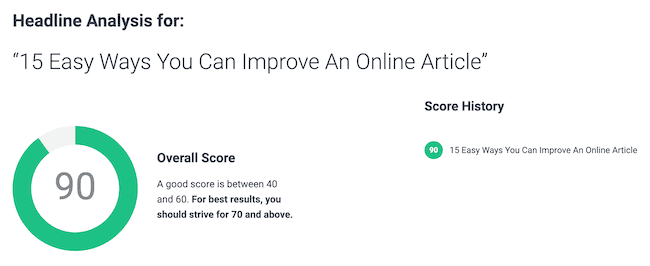
A more compelling title will always help attract attention and encourage people to click through to read your article.
If you can, try to state the problem and the promise of a solution.
2. Improve your featured image
Most articles include a featured image between the title and the main text.
It’s one of the important factors in getting more traffic, especially if you are promoting your articles on social media.
If you don’t have one, you can easily design one with a free account with Canva.
You might also consider changing your existing image if you think you can do better.
3. Add a table of contents
You can find many free table of contents (TOC) plugins for most blogging platforms.
Adding a table of contents to your blog benefits your readers and your SEO.
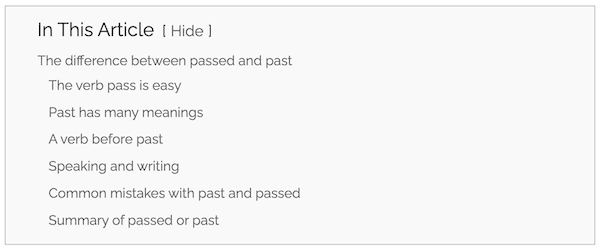
It gives readers a quick overview of your article. Positioning it after your introduction also helps keep their attention.
Readers can also click on one of the lines to go straight to an item that interests them.
It’s also a great addition to help improve your SEO very quickly.
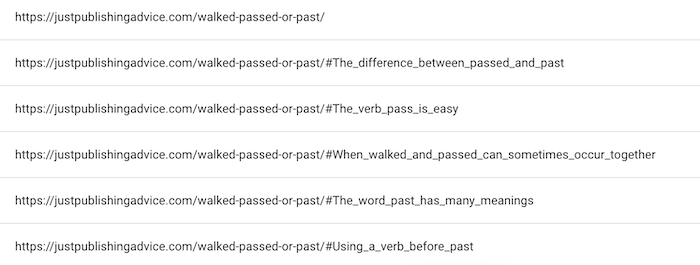
Each link in your table of contents can be indexed; sometimes, search engines will index them as separate pages.
You can see in the image below how Google uses the TOC items to create new points of entry.
If you only make one improvement to your blog from my list, this is the one to do.
Adding a table of contents will apply to all your existing posts, so it will improve your entire blog with only a few minutes of work.
Phase 2: The “Readability” Fixes
Once a reader lands on your page, these improvements ensure they don’t get overwhelmed and actually read the content.
4. Shorten your paragraphs
Long paragraphs are very difficult to read online, especially on a mobile phone. Take a look at your articles, and if you see that you have used big, chunky paragraphs, it might be a reason that people are not reading your articles in full. When you see more than three or four lines of text on a laptop screen, it will become ten or twelve lines on a phone.
It’s an easy fix.
Just add more paragraph breaks.
Spacing out your sentences will make your article much easier to scan and read.
5. Be more concise
It’s always a good idea to cut out the fluff.
When you find sentences that are overly long, chop them up and remove any unnecessary words.
Good candidates for an edit are introductory expressions.
Here’s an example of a sentence that is a perfect candidate for the chop.
What I would like to say is that if you find that you are having trouble coming up with writing ideas, try a Google Search.
If you need writing ideas, try a Google Search.
When you trim the fat, your writing is much easier to understand.
6. Use more headings
Headings are guideposts for your readers. It helps them scan an article if they are looking for specific information.
You can also use headings to create a table of contents for a longer article.
If you see that a section of your text is more than 250 -300 words, it’s a good idea to break it into two sections with an extra heading.
Not only is it more informative, but it also makes your article easier to read.
7. Check again for errors
Most importantly, always do another grammar and spell-check whenever you edit, change, or modify your articles.
Editing can always lead to new mistakes or typos. So, never republish your article without careful checking and proofreading.
Phase 3: The “SEO & Authority” Fixes
These are the technical and qualitative tweaks that tell search engines and readers that your article is a high-value resource.
8. Add more information
No matter what you wrote about, you can always add more text to give it more meat on the bone.
Think about where you can expand on specific points or add more examples or references.
Perhaps something changed since you wrote it.
So you can now add more up-to-date information.
A good prompt I often use is to read messages or online comments I receive and look at the questions people ask.
Very often, I update an article to answer some of these questions.
9. Add an image or graph
Nothing explains something as quickly as an image or graph.
If you wrote an article about SEO, Core Web Vitals, and site speed, including a graph can work wonders.
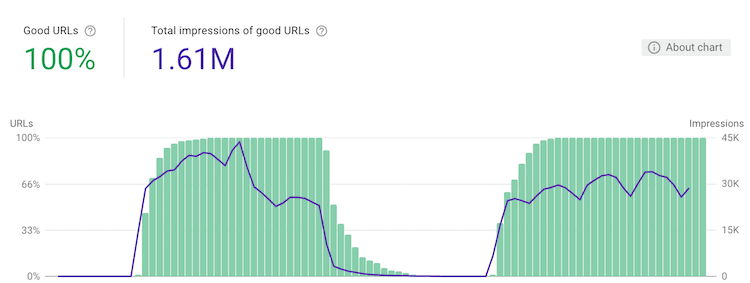
Graphs and tables are a terrific way to prove your point in your articles.
You don’t need to rely on only graph screenshots because you can easily create your graphs in Excel or Apple Numbers. You can also create tables in HTML to use in your article.
10. Change your POV
Is your article talking to or at your readers?
If you wrote it in the first-person point of view, you used a lot of I, me, and my.
But by editing your article to include more of the second-person point of view, you will use more you and your.
Here’s a simple example.
I know it’s hard to write an essay. (First-person)
You know it’s hard to write an essay. (Second-person)

Now, you are including your reader. It’s a simple trick to improve an online article.
11. Add more facts, figures, or quotes
Whenever you make a statement or a recommendation, it’s always better to back it up with some proof.
It’s hot in the Sahara.
So, how hot? What temperatures? Who collected the data? What are the differences between monthly temperatures?
When you include references like facts, figures, and quotations, you increase the validity of your article.
12. Check your keyword use
Every article you write should use a keyword phrase.
Even with AI Search, search engines still need a hint about the subject of your article, and using keywords helps.
Your primary keyword phrase needs to be at least three or four words. For this article, I am using the phrase, improve an online article.
Make sure you have included your phrase in your title, in the first sentence, and then once or twice in your text.
Doing this will significantly enhance your prospects of getting your article indexed by search engines.
Phase 4: Site-Wide Foundations & Retention
These points help your entire blog perform better by building authority and keeping readers on your site.
13. Add links to your other articles

Adding links between your articles is one of the best ways to get more readers from search engines.
It’s called internal linking because you are connecting your articles.
When you write a new article, add a few links to your earlier articles.
Then, add one link from two or three old articles to your new one.
If you aren’t using internal linking already, it’s easy to start adding links between your existing articles.
14. Include an author box
Like adding a table of contents, including an author box can improve your entire site.
Most blog themes have the option to add your author profile at the end of each article.
Keep it simple, but always include a profile image. Blog themes often use your Gravatar image, so it’s easy.

I keep mine short and sweet. But you can usually add social links or a link to your About page if you wish.
The big benefit of an author box is that it can help you a little with your E-E-A-T rating.
E-E-A-T stands for experience, expertise, authoritativeness, and trustworthiness, and Google uses it as a measure of your competence to write on a subject.
An author box helps show why you are an expert in your field.
15. Include related posts
You can add these automatically with most blogging platforms or themes.
Add a maximum of three related posts at the end of your article.
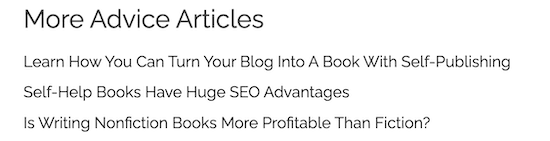
There are two benefits.
One is that they can help keep a reader on your site.
The second is that search engines will notice the links and help give a little extra weight to your posts.
You can also add these manually to make sure that the links are relevant for readers.
Summary
Yes, you should always be writing new articles.
But never forget that your existing articles always need your care and attention.
Things change all the time, so keeping your articles up to date is a must.
A great idea is to have a spreadsheet with all your articles, and then you can add the date that you last updated each one.
Check it from time to time, and perhaps make it a habit to look at refreshing your articles every six months.
However, one thing is for sure. You can always make improvements.
Related reading: Questions In Blog Writing Help You Write Better Articles

English teacher, writer, and author. Passionate about grammar, creative writing, and self-publishing. Always exploring new tools and tech to help writers succeed.