When you self-publish a book on Amazon, you need to select your KDP book categories.
You can only select three, so you need to be sure your choices will work well for you.
But here’s the catch. Not every category or genre that Amazon lists for you to choose from is a category that has a best-selling page on the Amazon Store.
That’s why some categories are often called “ghosts” because they don’t have their own bestseller page and instead redirect to Amazon’s main Best Sellers page.
What are ghost categories on Amazon?
Selecting KDP book categories, or genres, has changed over the years. Originally, you could only choose two, but you could contact Amazon KDP and request up to eight more.
Because book buyers often start a search from a category, it was a great way to get your book to appear in more category searches.
However, Amazon changed this practice of allowing so many categories, and now only allows a book to appear in three categories.
Another change affected which categories link to their own bestseller pages.
While authors and publishers can still choose from a long list of categories when they publish, not all of them lead to a best-selling page.
These are the ghost categories. They are available to choose, but will link to the main best-selling page on Amazon and not to a dedicated page.
One of the best ways to sell books and ebooks on Amazon is to appear in targeted bestseller lists and in search results for relevant keywords.
But if you unwittingly select ghost categories, you may lose potential visibility in the Kindle Store because readers can’t browse those categories directly.
The problem is that you can’t tell if a category is a ghost when you make your selections in KDP.
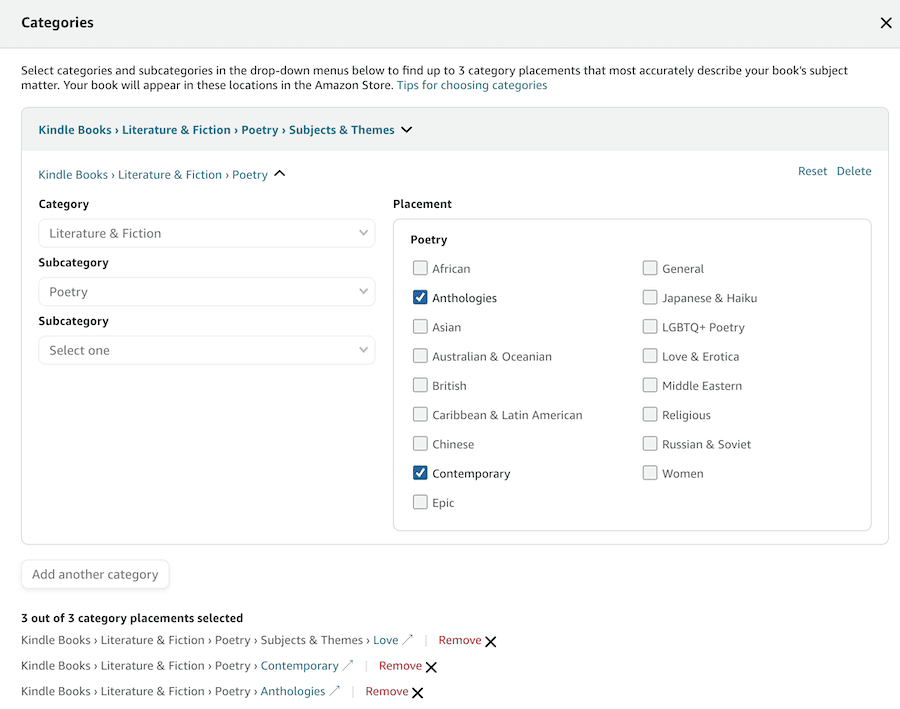
So how can you avoid making a poor category selection?
How to check for ghost categories
The only way to be sure a category has its own page is to check the Amazon Best Sellers page and use the list on the left to navigate to categories applicable to your book.
Be aware, though, that there are two main pages. One for “Books,” and one for “Kindle eBooks.”
So it means you have to navigate your way twice to find suitable categories because the categories are different for books and Kindle ebooks.
For example:
Kindle eBooks > Literature & Fiction > Contemporary Fiction > Romance
Books > Romance > Contemporary
When you find a suitable category, look at the details of a few top-selling books to see the categories. This can give you ideas about other categories you can select.
Best Sellers Rank: #20 in Kindle Store (See Top 100 in Kindle Store)
#3 in Domestic Thrillers (Kindle Store)
#3 in Domestic Thrillers (Books)
#4 in Psychological Thrillers (Books)
It’s very difficult to rank in the major categories unless you sell a lot of books every day.
That’s why it’s always better to choose niche categories where there is not as much competition.
Kindle eBooks > Action & Adventure > Mystery, Thriller & Suspense > Mystery
Books > Science Fiction & Fantasy > Science Fiction > Hard Science Fiction
Another issue with KDP book categories is that some categories are duplicates. It means that a category you select may link to a similar category.
It’s not obvious, and you can’t see these using the Amazon Store to do your research.
You can find worthwhile categories by doing your research on Amazon, but your options are limited.
The only way you can be sure is to use software that links to the Amazon book and ebook database.
A better way to do your category research
No, it’s not free, but *Publisher Rocket is a popular software program many self-publishing authors use to select profitable categories and keywords, and perform competition analysis.
In Publisher Rocket, it shows you which categories are ghosts (gray), duplicates (blue), or selectable (green). As you can see below, it makes it much faster and easier to make the best choices.
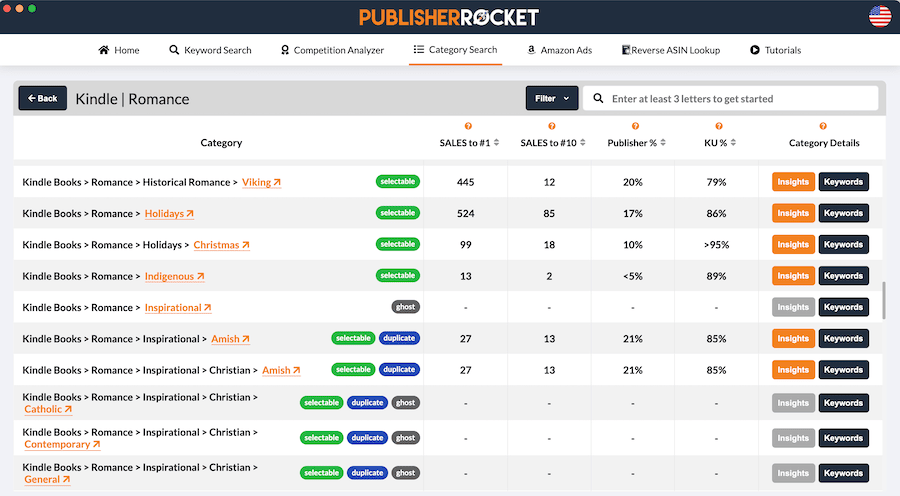
The links for each category open in the Amazon Store. You can see straight away whether the category has its own best-selling page or only leads to the default best-sellers page.
When you see this data, you’ll understand that there are a lot of ghost categories.
If you’re only self-publishing one book, the cost of premium software might not be worth it for you.
However, if you are publishing, or have published, more than a couple of titles, the cost might be worth it because you’ll have many more research tools at your fingertips on top of category selection.
You can read my full review of Publisher Rocket, which gives you a lot more information.
What happens if you choose a ghost category?
You can try free online tools or perhaps an AI assistant to help you find categories. But you can’t be sure that all the options you find are not ghosts.
My understanding is that your book can still be assigned to the ghost category internally.
But because there is no dedicated bestseller page, readers browsing Amazon won’t find or see a list of ranked books for that category.
That means a ghost category is likely to offer less discovery value than a category with its own bestseller page.
If you are new to self-publishing, choosing your categories from the Amazon Store is your best free starting point.
If you plan to publish an ebook and a print book, you can choose three different categories for each version.
But if you are publishing a Kindle ebook only, make sure you only select categories from the Kindle eBooks > categories.
As long as you can see a best-selling page for your category selections, you won’t have a problem with ghost categories.
Summary
According to a newsletter from Dave Chesson at Kindlepreneur, around 30% of the categories that are available to select when you publish are ghosts. Here’s an extract.
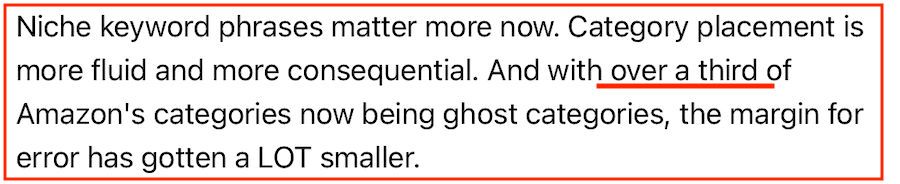
That’s in addition to duplicate categories.
Your category selections are a vital part of giving your book the best chance of discovery on Amazon, so it’s worth doing your research before you publish.
If you rush into publishing and selecting your categories on the fly, you can make costly selections.
Whether you choose to do your research the free way or by investing in software to help you, you’ll be giving your new book the best possible chance of success.
*This article contains affiliate links. If you use these links to buy a product or service, we may earn a commission.
Related Reading: 10 Smart Things To Do After Self-Publishing Your Book

English teacher, writer, and author. Passionate about grammar, creative writing, and self-publishing. Always exploring new tools and tech to help writers succeed.